
Introduction
How to Create a Professional CV
Creating a professional CV as a student is your gateway to securing internships, part-time work, and entry-level career opportunities. Many students feel overwhelmed by the drafting process, assuming that a lack of traditional employment history equals an empty page. However, a student curriculum vitae shifts the focus from years of corporate service to your academic milestones, transferable skills, project work, and extracurricular engagement. By structuring this document correctly, you present your potential rather than just your past.
This complete guide breaks down exactly how to translate your classroom learning, club leadership, and volunteer work into a format that stands out to modern recruiters. Whether you are using a standard word processor or building a clean, modern layout, you will learn the step-by-step methodology required to pass automatic screenings and secure face-to-face interviews.
Why and How to Create a Professional CV?
- Demonstrates Initiative: It shows employers you are proactive about your career trajectory prior to graduation.
- Highlights Transferable Skills: It frames your coursework, team projects, and club leadership as legitimate workplace skills.
- Passes ATS Screenings: A structured format ensures Applicant Tracking Systems read your credentials without errors.
- Prepares You for Networking: Gives you an immediate, polished document to share during career fairs and LinkedIn networking.
- Organizes Achievements: Keeps a running record of certifications, awards, and milestones for quick reference.
Table of Contents
The Best Tips: How to Create a Professional CV
1. Prioritize an ATS-Friendly Layout
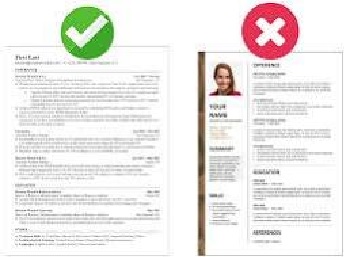
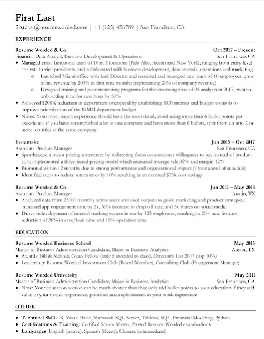
Keep your layout perfectly organized and easily readable by automated applicant tracking software. Use standard, clear headings and common fonts like Arial or Calibri. Avoid placing critical info inside text boxes, tables, or decorative shapes, which can confuse screening systems.
2. Lead with an Academic Focus
As a student, place your education section right at the top of your page. Include your degree title, institutional name, expected graduation year, and GPA if it is above 3.5. Feature relevant completed coursework or unique capstone projects to show industry context.

3. Quantify Bullet Points with Action Verbs
When detailing extracurricular activities, volunteer roles, or part-time work, always lead with action verbs like managed, built, or led. Try to tie your actions directly to measurable outcomes, such as percentage improvements or project scope sizes.
4. Save and Deliver Securely
Always save your final document using a simple, professional file name like “Firstname_Lastname_CV.pdf”. Exporting your file as a PDF keeps your formatting, custom spacing, and margins perfectly intact across different screens.
Outcomes of a Professional CV
- Increased Response Rates: Structured layouts grab recruiter attention within the first six seconds.
- Interview Invitations: Tailored keywords help your application pass the initial screening filters.
- Confidence Boost: Seeing your academic and personal accomplishments compiled builds career confidence.
- Higher Starting Salaries: Polished applications frequently position candidates for premium, competitive internship tiers.
External Resources: How to create a Professional CV
- Build professional, modern resumes using the Zety CV Maker Platform.
- Review comprehensive entry-level student career path examples on Indeed Career Advice.
- Practice downloading clean, automated screening templates via Resume Genius Guides.
Frequently Asked Questions (FAQs)
Q1: How long should a student CV be?
- Keep it to exactly one page. Most students do not have enough corporate experience to justify a second page.
Q2: Should I include a photo on my CV?
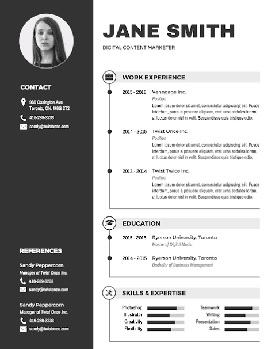
- Avoid photos unless you are applying for acting or modeling roles. Standard corporate filters reject photos to ensure bias-free hiring.
Q3: What if I have absolutely zero work experience?
- Rely heavily on your academic history. Highlight university club activities, group projects, volunteer events, and technical certifications.
Q4: Is a CV different from a resume?
- In North America, a CV is long and academic, while a resume is a one-page career summary. Internationally, the terms are used interchangeably.
Q5: What font size should I use?
- Use 10 to 12 points for body text and 14 to 16 points for your section headers.
Q6: Should I include references?
- Do not list reference names early on. Use the space for skills, and provide references separately when requested by the recruiter.
Final Thoughts
Building a standout student CV requires prioritizing relevance and clear formatting over sheer career length. Treat your academic projects, clubs, and technical skills as valid experience, and format them clearly to pass automated tracking software. Regularly update your file as you finish semesters to stay ready for unexpected job openings.
If you would like to refine your draft further, tell me your academic major, target job or internship industry, and any campus clubs or projects you have completed so we can write your personalized CV summary together.
Internal Links: How to Create a Professional CV
- Download Center
- How to Prepare for a Scholarship Interview
- How to Write a Powerful Statement of Purpose
- How to Write a Winning Scholarship Application
- Scholarship Application Checklist
- SOP Template
- Motivation Letter Template
- Recommendation Letter Template
- Internal Scholarship
- International Internships